CrewGauge

CrewGauge for small contractors managing subcontractors

Know what your subs did, what they are owed, and what each job is costing.

CrewGauge is the field-to-checkbook app for small construction companies managing subs. Capture billable time and GPS-backed context from the field, then approve, mark paid, and export clean records by project. Mileage, expenses, job updates, and photos (coming next).

Where the day's work gets sorted before the checks get cut.

Point-in-time GPS context. Not all-day tracking.

  • Field records your subs can submit
  • Approval queues your office can trust
  • Project exports your books can use
Owner and subcontractor reviewing subcontractor time tracking and field records on a jobsite

The old way is messy

Stop sorting the day from text threads, screenshots, and memory.

Small contractors do not usually have a clean field-to-checkbook system for subs. Hours come in by text. Receipts show up as photos. Mileage gets remembered later. Job updates are buried in a thread. Then the owner has to decide what is owed before the record is clean.

  • Time is submitted late, rounded, or missing job context.
  • Mileage and expenses are scattered across texts and receipts.
  • Photos and job updates are separated from the pay record.
  • Owners chase clarification before checks can be cut.
  • Labor cost by project is hard to trust until the job is already over.

CrewGauge turns the end-of-day tailgate conversation into a clean record: who worked, what happened, what is owed, and what each job is costing.

Contractor sorting receipts, texts, and paperwork at a kitchen table

The tailgate record

Where the day's work gets sorted before checks get cut.

CrewGauge fits the way small construction companies actually work: subs, crews, trucks, jobsites, checks, cash, Zelle, Excel, QuickBooks, and a lot of end-of-day sorting.

Who worked?

Which subs and crews were on the job today.

What happened?

Time and notes from the field, with photos and job updates (coming next).

What is owed?

Billable labor today, with mileage and expenses (coming next) tied to the job.

What needs review?

Missing context or unusual entries flagged before payment.

Crew meeting at a job trailer tailgate before field records get sorted

Three steps

From the field to the checkbook, without the paper chase.

  1. Interface concept: subcontractor time entry from a phone on site

    1. Subs submit the field record

    Time and GPS-backed context are tied to the right job. Mileage, expenses, notes, photos, and job updates (coming next).

  2. Interface concept: owner review queue for submitted field records

    2. Owners review what needs attention

    Clean records move forward. Exceptions and unclear items get flagged for review or clarification.

  3. Interface concept: approving records and preparing a project export

    3. Approve, mark paid, and export

    Approve what is owed, record payment status, and export records by project.

What CrewGauge helps you capture

Time, costs, proof, and job updates (coming next) in one field record.

Pilot focus starts with offline time records, owner review, and CSV export. Mileage, expenses, photos, and job updates are part of the field-record workflow as pilot modules are enabled.

  • Billable time by job, sub, worker, trade, or work category
  • Manual time entries with reason and owner review
  • Optional clock-in and clock-out
  • Point-in-time GPS and QR-backed job context
  • Mileage and reimbursement requests (coming next)
  • Expense entries with receipt/photo support (coming next)
  • Job updates: done, blocked, needs material, needs decision (coming next)
  • Photos and notes tied to jobs, time, expenses, or updates (coming next)
  • Owner approval queue
  • Request clarification instead of chasing texts
  • Mark approved items as paid by check, cash, Zelle, or other method
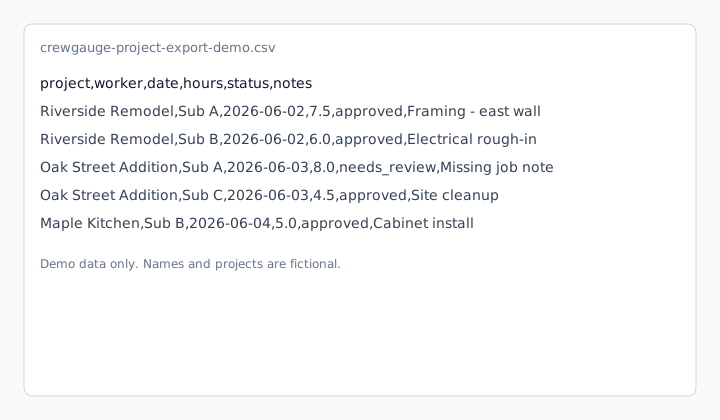
  • CSV export for QuickBooks, Excel, invoicing backup, or records
Interface concept: desk screen layout for time, costs, photos, and exports

For owners

Know what happened on every job before you pay for it.

Stop rebuilding the week from texts. CrewGauge gives you one review flow for sub labor, with mileage, expenses, photos, and job updates (coming next), before money goes out. Review the exceptions, not every record from scratch.

  • See pending, approved, and paid records by project
  • Review billable time, with mileage, expenses, and job updates (coming next) together
  • Catch missing context before checks are cut
  • Request clarification without losing the trail
  • Export clean records to support the books
  • Clean - ready to approve
  • Needs review - missing context or unusual entry
  • Pending sync - captured in the field, waiting to upload
  • Approved/exported - ready for records or books
General contractor walking an active jobsite with a tablet

For subs

Submit a clean record and get paid with less back-and-forth.

CrewGauge gives subs a simple way to submit billable time from the field, even when service is bad. Mileage, expenses, notes, and job photos (coming next).

  • Log billable time by job
  • Submit mileage or expenses with notes and photos (coming next)
  • Add job updates when work is done, blocked, or waiting on a decision (coming next)
  • Save submissions even when service is bad
  • Keep a clearer record with fewer follow-up texts
Interface concept: field worker submitting a time entry from a phone

Cleaner records without tracking crews all day

Submission context, not all-day surveillance.

CrewGauge is built to support clean records, not to monitor crews all day. Capture point-in-time context when a sub submits a record, then use that context to review the work fairly.

  • Point-in-time GPS context at submission
  • QR-backed job context when available
  • Notes and photos tied to the record (coming next)
  • Review flags for unclear entries
  • No continuous GPS tracking
Worker scanning a mounted QR code to attach voluntary job context to a submission

Built for real field crews

Honest about what CrewGauge is today

CrewGauge is built by Donny McIver at Alethos, LLC - inspired by local teams frustrated with how they managed field crews and subs.

Location is captured only at submission, when a record is created.

Donny McIver, founder

Sample CSV export with anonymized demo project time records

Job-cost visibility

See labor cost by project before the job is over.

When field records stay tied to the right job, owners can see what each project is costing in labor and reimbursements (coming next) - not just after the fact.

  • Records grouped by project and job
  • Pending, approved, and paid status in one view
  • Cleaner exports for job-cost review
Screen layout concept: job cost review dashboard in a modest office

Export clean records

Approve, mark paid, and export by project.

CrewGauge does not replace QuickBooks or your books. It helps you get cleaner field records into the tools you already use.

  • CSV export for QuickBooks, Excel, or invoicing backup
  • Mark paid by check, cash, Zelle, or other method
  • Keep a trail from field submission to export
Organized field records, export paperwork, and checkbook materials on a desk

Field to checkbook

Where the day gets sorted before checks get cut.

See how CrewGauge turns scattered field activity into cleaner records your office can review, approve, mark paid, and export by project. Mileage, expenses, photos, and job updates (coming next).

Interface concept: time entry from a phone on site

Field record submission

Subs submit time and context from the jobsite. Mileage, expenses, photos, and job updates (coming next).

FAQ

Common questions from contractors managing subs.

CrewGauge is the field-to-checkbook app for small construction companies managing subs. It helps you capture field time and submission context today, with mileage, expenses, photos, and job updates (coming next), then approve, mark paid, and export clean records by project.

Small crew meeting outside a job trailer for a one-crew pilot start

Pilot

Start with one crew.

CrewGauge is being built for small contractors who need cleaner field records before checks get cut. Join the pilot and help shape the field-to-checkbook workflow.

Pilot starts with offline time, owner review, and CSV export. CrewGauge is developed by Alethos, LLC.